Your AI office manager. Talk to it from the job site.
Built for contractors, remodelers, designers and realtors. Say a sentence and DoDoo files it: the task, the appointment, the note on the Maple Street job. It watches your open invoices and quotes in QuickBooks or Zoho Books, tells you who to chase, and drafts the email — you read it and press Send. Nothing goes out without your OK.
$8.99 a month or $49.99 a year after the trial, cancel any time. Works in any browser today; the iPhone and Apple Watch app is in beta.
 Coming soon on theApp Store
 Coming soon onGoogle Play
Three steps, one sentence.
No forms, no dropdowns. You talk the way you'd talk to an office manager who already knows your jobs and your customers.
Tell DoDoo
From the truck, the site or the desk: "Who owes me money?" "Follow up on the Okafor quote." "Measure the Parker kitchen Thursday at 9."
Check the draft
DoDoo shows exactly what it will file, or the email it wrote, before anything happens. Change a word, drop a line, or approve.
Get on with the job
Tasks land in the project, appointments sync to your calendar, the follow-up opens in your own mail app with everything filled in. You press Send.
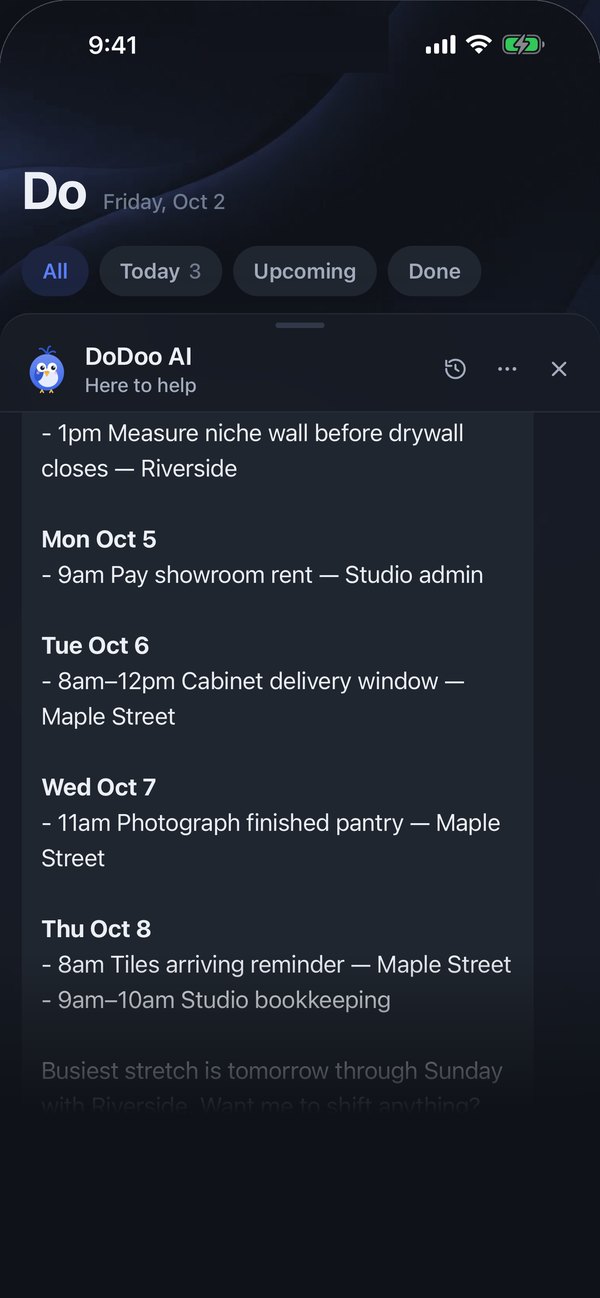
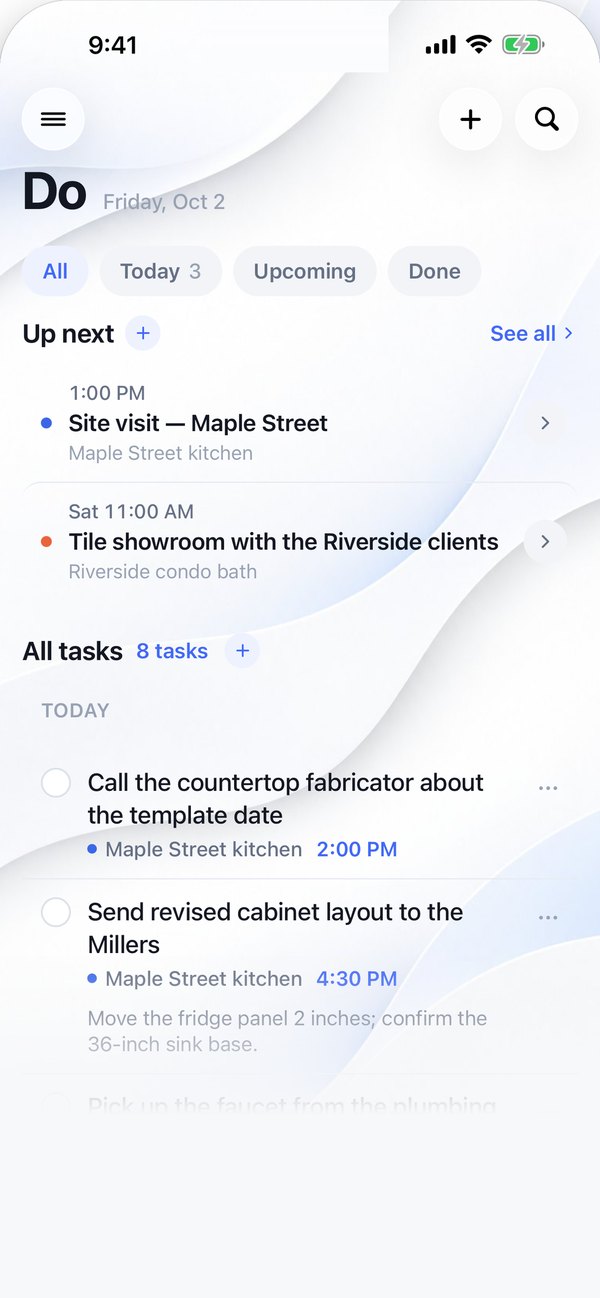
Light by day. Dark by night.
The same calm screen on both. Your day up top, DoDoo one tap away.
Shown here on iPhone — the app is in beta. The same screens run in your browser today.
Coming soon on theApp Store
Everything a small business day needs. Nothing it doesn't.
Voice that gets context
"Move Emily's template to Friday afternoon" works, because DoDoo knows which appointment you mean.
Calendar in the same place
Day, week and month next to your tasks. Press and hold a slot to book it. Google Calendar stays in sync.
Clients and their projects
One client, as many jobs as they give you. Each project holds only its own tasks, notes, appointments and money. Step out and see your whole day again.
Notes you can dictate
A wall dimension, a client's finish choice, a thought on the drive home. Filed to the project, searchable later.
Money, watched for you
Connect QuickBooks Online or Zoho Books. ProDo mirrors your open invoices and quotes, read-only, and shows what's overdue, what's due this week and which quotes are still waiting on a yes.
Follow-ups you approve
"Chase the Okafor invoice" and DoDoo writes a warm, specific note with the number, the amount and the days. It opens in your own mail app; you read it and send it. ProDo never emails anyone.
A daily brief, a weekly plan
Each morning: what's on, what's late, who owes you. On Mondays: the phases starting, what's behind, what clients still owe you an answer on, and overdue invoices with a reminder ready to send.
A timeline you draw
Draw each phase as a bar, drag it to move, pull its ends to stretch it. Or just say it: “push tile two days.”
Selections and change orders
Finishes and fixtures gathered by room, each marked approved or pending. Change orders with price and days; mark one approved and the timeline moves for you. The client gets a clear email you send.
On your wrist, on your lock screen, in your pocket.
ProDo lives where your day happens, not behind a laptop.
- Apple Watch: tap "Tell DoDoo" and the app is already listening. Next items on a complication.
- Home and lock-screen widgets: what's up next, plus Ask and mic buttons.
- Reminders arrive on every device you sign in to.
Your plans are yours.
ProDo uses AI, so here is what that means for you.
- What DoDoo sees
- What you say or type, plus the tasks, notes and appointments it needs to answer. Nothing is used to train AI models.
- Your calendar
- ProDo writes to a calendar it creates for you in Google Calendar and never edits events it didn't make.
- Leaving is easy
- Export everything as an Excel file any time. Delete your account and the data goes with it.
One plan. Everything in it. Try it free for 14 days.
Priced for a business, not an app: less than an hour of billable time a month. The trial is the full product.
ProDo
or $49.99 a year — save over 50%
14 days free, then $8.99 a month or $49.99 a year. Cancel any time from your account; cancel during the trial and nothing is charged.
- DoDoo: talk or type, it files tasks, notes and appointments
- Clients, projects, timelines, selections and change orders
- Calendar, reminders and the morning brief — Google Calendar sync, plus a link for Apple Calendar and Outlook
- QuickBooks Online or Zoho Books connection, read-only
- Overdue invoices and open quotes, watched daily
- Follow-up emails drafted for you, sent by you
- Web today; iPhone and Apple Watch app included when it ships
Questions people ask.
Who is ProDo for?
Owner-operators and small crews in the trades, design and real estate: contractors, remodelers, kitchen and bath designers, installers, realtors, small shops. It grew out of a working design studio. If your week is jobs, site visits, quotes and invoices, it will feel familiar on day one.
Does ProDo send emails to my customers?
Never. DoDoo writes the draft; it opens in your own mail app (Mail, Gmail, Outlook) with the address, subject and text filled in. You read it and press Send. Nothing leaves without you.
Does it change anything in my accounting?
No. The QuickBooks and Zoho connections are read-only. ProDo mirrors open invoices and quotes so it can tell you what to chase; your books stay exactly as they are. Disconnect any time and the mirror is deleted.
Will DoDoo move things around without asking?
Never. It proposes, you confirm. Cancelling an appointment, merging projects or adding attendees always asks first, and everything can be undone.
Which accounting systems and calendars?
QuickBooks Online and Zoho Books today; FreshBooks and Xero are on the list. Google Calendar syncs both ways. Apple Calendar and Outlook can subscribe to your ProDo calendar today; two-way sync for them is coming.
Is there a phone app?
ProDo works in any browser today, phone included. The iPhone and Apple Watch app is in beta and is part of the same plan when it ships; Android follows.
Can I use it without voice?
Yes. Everything works by typing and tapping. Voice is the fast way, not the only way.
Who makes ProDo?
ProDo is made by GM Apps LLC. It started as the office manager of a working kitchen and bath studio, chasing that studio's own invoices, before it became a product.
Give your business an office manager this week.
Sign up, connect your books, and ask DoDoo who owes you money. 14 days free, cancel any time.
Questions? info@prodoapp.net